|
|
Main Categories: Edit
Sub Categories:
Input Files: SRT, SSA, TXT
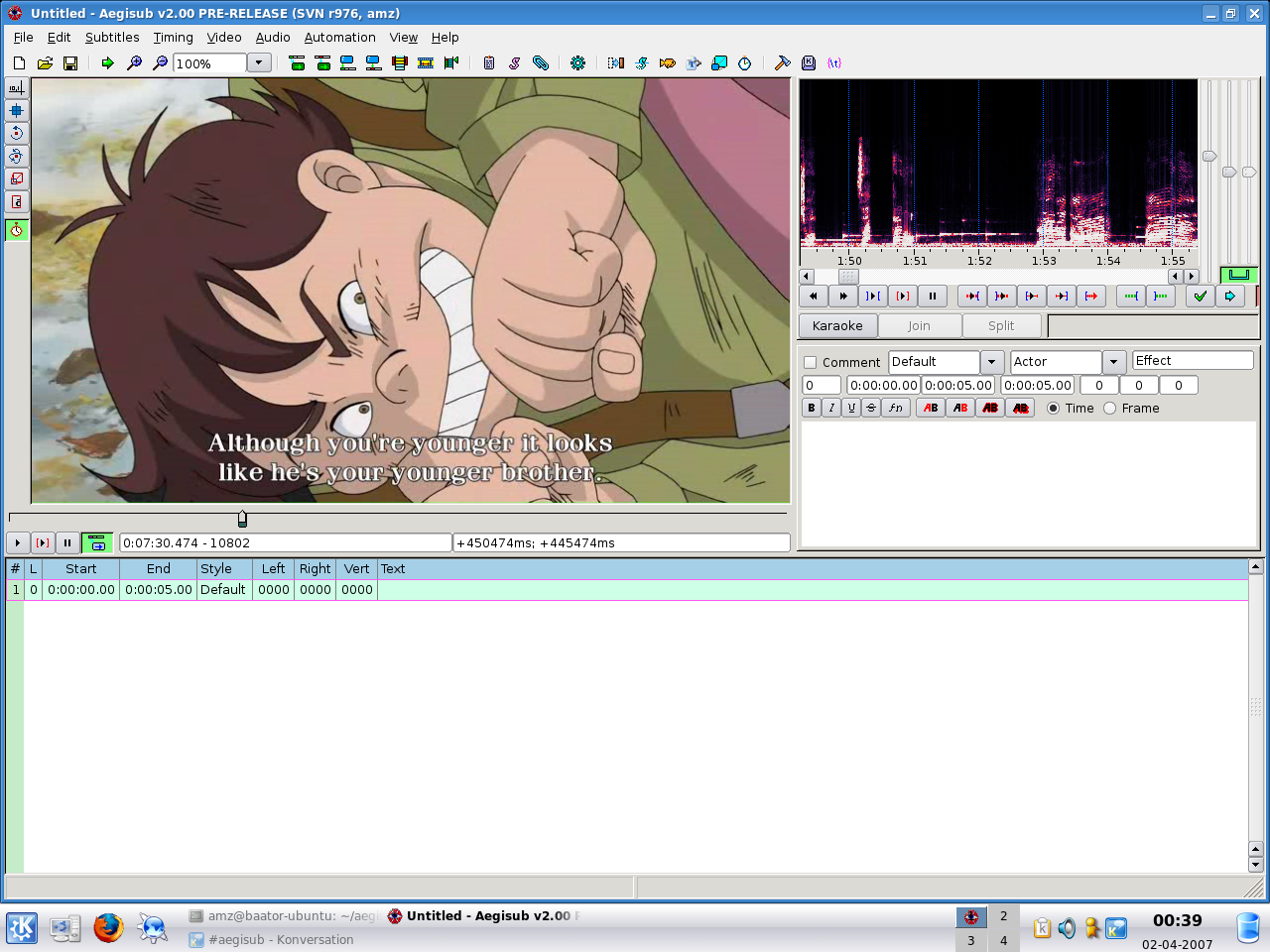
Aegisub is the result of a few months of work in a project designed to completely replace Medusa for typesetting, as well as add a large number of useful and/or vital features that Medusa lacks.
Features:
- Unicode in UTF-7, UTF-8, UTF-16LE and UTF-16BE encodings
- Importing non-Unicode subtitles from over 30 different character encodings, including Shift_JIS, allowing you to resume work on any subtitles regardless of your system locale settings
- Loading advanced Substation Alpha (.ass), Substation Alpha (.ssa), Subrip (.srt) and Plain-Text (.txt) (with actor data) subtitle formats
- Full tag conversion from SRT to ASS
- Multiple Undo levels
- Powerful Automation module using the Lua scripting language to create advanced karaoke effects (including per-syllable effects, similar to AssCalc) - or any other kind of subtitles manipulation
- Syntax highlighting
- Fonts collector to collect all fonts used in a script into a folder
- Opening of videos via Avisynth for true preview of subtitles using VSFilter, in any format supported by DirectShow
- Aspect ratio overriding for anamorphic videos
- Variable Frame Rate videos via timecodes file (v1 and v2), including exporting processed times for hardsubbing
- Display of video coordinates under mouse and simple auto positioning support
- Audio mode which allows you to open files in any format that your DirectShow can decode, including Wave, mp3, Ogg Vorbis, AAC, AC3 and others
- Powerful audio timing and playback mode, including full support for karaoke manipulation
- Functions and hotkeys easily synchronizing audio/video and subtitles
- Time shifting and manipulation by timestamps or frame numbers (once video or timecodes are loaded)
- Advanced find and replace with support for Regular Expressions
- Cut/Copy/Paste subtitles via plain-text format, so it can be pasted in any plain-text editor
- Translation assistant to easily translate subtitles to another language
- Styling assistant to quickly pick styles for each line in subtitles
- Styles manager that allows you to categorize subtitles styles, to make working on several projects painless
- Keyframe navigation for fast seeking to scene boundaries
- Several subtitles manipulation macros, such as making timing continuous or recombining double lines after OCR
- Highlighting of subtitles that are visible on current video frame, and a button to select those
- Preview subtitle changes imediately by pressing Ctrl+Enter
- Shortcut buttons to set text as bold, italic, underline, strikeout, change font or any of the 4 colors
- Extensive manual with detailed instructions and tutorials for typesetting and program usage
Version 1.10 Beta
- Release Date: Aug 8, 2006
- Always defaults to Audio Cache=1 (ram) now (Myrsloik)
- Automation: Added xor(a,b) boolean logical function to utils.lua (jfs)
- Automation: Various changes to karaskel.lua and karaskel-adv.lua: (jfs)
- Added some debug-calls (which are disabled by default; aegisub.output_debug is replaced with a do-nothing function (you can change this in karaskel.lua)
- The regular aegisub.output_debug is aliased to aegisub.output_warning, in order to always be able to show real warnings, in case something goes wrong
- Fixed bug, triggered when a line had a style not defined in the subs. A warning is now shown instead.
- Fixed bug in parser that would cause Aegisub to crash if you had a \fn without parameters and tried to pick font. (AMZ)
- Fixed crash when opening audio that appeared in 1.08 (Myrsloik)
- Karaoke mode changes: (jfs)
- New syllable-splitter: Click "split" to enable splitting-mode, click in syllable view to set split-markers, then click commit to do the splitting
- The correct \k tag (\k, \kf, \ko, \K) is now kept when splitting/joining
- When editing karaoke-timing for a line and not splitting/joining, all tags are kept intact, so only the \k tag timings are changed
- Right-click in karaoke area to change the tag (\k, \kf, \ko)
- Click and drag to select multiple syllables
- Fixed bug where \t tags (among others?) would lose their parameters when being rebuilt (happens with Framerate Transport export filter, Automation and during the karaoke timing improvements listed above, among other places) (jfs)
- Implemented FexTracker, for automatically tracking positions on the video and placing text accordingly (Tentacle)
- Drag-and-drop files onto the program no longer causes the subs to be unloaded every time, even if no subs were dropped (jfs)
- 1,1+2 recombining lines where 1 is a substring of 2 no longer causes incorrect behavior. 1+2,2 similarly fixed. This fix also gives more sanity-checking in the recombining (jfs)
- Replaced the subtitles grid with a custom control, which should hopefully behave and look better. (AMZ) Changes are:
- Currently active line is now highlighted with a border.
- The grid can optionally no longer receive focus (this behavior is disabled by default, change "Grid Allow Focus" to 0 in config.dat to prevent it from getting focus).
- Fixed bug related to tag cycling, which would reset grid, move video and force a refresh of everything (slow, and could undo uncommited changes).
- Rows colliding with the currently active one will now be highlighted in grid.
- Selected comments are now highlighted in a different color.
- Fixed behavior of deleting and joining lines on grid.
- Inserted lines will now be automatically selected.
- Alt+Click on grid will activate the clicked line, without modifying selection.
- Actor and effect columns are now only visible if they are being used.
- Double clicking a row will jump video to it, regardless of auto go to option.
- Unhandled keypresses in grid will now be sent to the audio display.
- Toolbar will now properly disable the Jump To buttons if more than one line is selected. (AMZ)
- Fixed the toolbar "grey area" glitch (was actually a wxWidgets issue). (AMZ)
- Default video zoom can now be set in config.dat and is defaulted to 100%. (AMZ)
- Fixed crash in Translation and Styling assistants, when you attempted to move past end of file, and then play. (AMZ)
- Fixed linked commit of times, so it will only commit both times if the other was changed (to prevent damage when editing multiple lines). (AMZ)
- Fixed some bugs related to inserting overrides via the buttons over the edit box. (AMZ)
- Implemented Redo (and there was much rejoicing). (AMZ)
- Fonts collector will now default collection to same folder as script (Set to "?script" on config.dat). (AMZ)
- Alt+Left/Right on the video seek bar will now seek by increments of 10 frames (increment is customizeable in config.dat). (AMZ)
- Added a simple audio resync method for video playback. (AMZ)
- Audio timing will now apply to all selected lines, as well as active line. (AMZ)
- Added a volume slider bar to audio mode. (AMZ)
- Fixed some internal workings, which should make Aegisub use considerably less RAM (especially for large Karaoke files, 8-10x less RAM usage was measured with a 9 MB file). (AMZ)
- Aegisub will now dump the stack to stack.txt when it crashes with a fatal exception, which might or might not work. (AMZ)
- Audio display in SSA mode will no longer ignore clicks if it wasn't focused (AMZ)
- The font override button in the subtitles edit box can now modify font size, italics, bold and underline as well as font face (no strikeout, as wx does not provide an interface to access that data). (AMZ)
- Now requires Avisynth 2.5.6a or later, added an option ("allow ancient avisynth") to override it to config.dat. (Myrsloik)
- Added reading of keyframe and timecode data from Matroska files (which are still not recommended, due to their dependency on DirectShowSource). (AMZ)
- Added forums and bugtracker to Help menu. (AMZ)
- Fixed Fonts Collector behavior with font shortcuts. (AMZ)
- Better error reporting when loading Automation scripts (jfs)
- Attempting to load a file which does not exist no longer unloads previous subtitles. (AMZ)
- Dragging timecode files into the Aegisub window will now work as expected (instead of attempting to load it as subtitles). (AMZ)
- Middle clicking the video seek bar and audio display will now focus them. (AMZ)
- Search and Replace dialogue made modeless. (Pomyk)
- Fixed bug related to moving elements up and down in File Export dialog. (Pomyk)
- Scrollbar and sliders in audio box can no longer receive focus. (Pomyk)
- Select lines dialog now has an option on how to deal with comment lines. (Pomyk)
- Last folder for all the file selection dialogs are now remembered in config.dat. (Pomyk)
- Audio current play position cursor will now always be visible. (AMZ)
- Removed video frame/subtitles time sync controls from the grid context menu. (AMZ)
- Timeline is now drawn below audio display. (AMZ)
- Dragging the timeline will now scroll audio display. (AMZ)
- Fixed bug which caused extra newlines to be added at the end of file. (AMZ)
- Added a horizontal scrollbar to shift times history. (AMZ)
- Removed the "Help" button from Find/Replace dialog. (AMZ)
- Added a bias slider to the "make times continuous" function in timing post-processor, which sets the point between the subs where the two lines will meet. (AMZ)
- Separated keyframe thresholds on the timing post-processor in start and end. (AMZ)
- Aegisub no longer enjoys littering your temporary files folder with 0 kB files. (AMZ)
- Pre-Rendered Subtitles (PRS) export added. (AMZ)
- Not directly related, but PRS Avisynth filter added to Aegisub SVN tree. (AMZ)
- New languages available:
- Spanish (thanks to NeSuKuN)
- Italian (thanks to EmBoLo)
- Korean (thanks to oblisk)
- Danish (thanks to mulrich and jfs)
- Hungarian (thanks to Yuri)
- Style editor now uses a dropdown for the encoding field, with encoding names taken straight from wingdi.h. (AMZ)
- Added 2.35 and custom aspect ratio support for video display. (AMZ)
- The manual has been extensively re-written and extended to include documentation about a lot of new (and some not so new) features. It's reasonably complete... for the moment. (TheFluff, Motoko-chan, jfs)
- Text edit boxes in the subtitle editing area will now revert to unmodified if you restore the original text. (AMZ)
- Re-arranged the controls in the subtitle editing area. (AMZ)
- Added a text box in subtitle editing area to edit the "Effect" field. (AMZ)
- Right-clicking on the header of the subtitles grid will now bring up a popup menu that allows you to disable columns. (AMZ)
- Saving back to SRT directly (that is, via "save", not "export" or "save as") is now allowed, as long as no data will be lost. (AMZ)
- Aegisub now supports file attachments, which are stored decoded (to save memory) and are not part of the undo stack (for the same reason). Previously, they were simply left ignored in the file as unknown lines. (AMZ)
- Implemented an Attached files list, where you can attach new fonts and graphics, extract them, or remove them from the script file. (AMZ)
- The Font Collector can now collect fonts as script attachments. (AMZ)
- Added recent menu to Video Timecodes. (AMZ)
- Playing in video mode will now play the audio as well even if it hasn't been previously loaded into audio mode (experimental). (AMZ)
- Added hotkey to Audio's "play to end of file" (defaulting to "T"). (AMZ)
- Fixed the default resolution for video display and resolution resampler when the script's field is blank. (AMZ)
- Stopping audio playback will now stop video playback as well. (AMZ)
- Implemented sorting of subtitles by start time. (AMZ)
- Recovered subtitle files are now saved in their own subfolder (customizeable in config.dat). (AMZ)
- Fixed crash with changing font properties via the subtitle edit box when there was a \fs override tag earlier in the line. (AMZ)
 |
Title: Official Download Site
Link: Download
Description: Download Aegisub from the official site
|
|
|
| |
Average Rating: |
Your Rating: |
| Registered Users: |
         (13 votes) |
|
| Non-Registered Users: |
         (15 votes) |
Sorry, but you must be logged in to use this feature. Please note that the forum has a separate login/registration system. You will need to sign up and login to the forum separately.
|
|
|
 |
|