News Articles
Movies Software
DivX, XviD, DVD Subtitles Forum
DigiWiki Codecs

Username:
Password:  
Remember Login?
Sign Up
 

Software - > Replay A/V

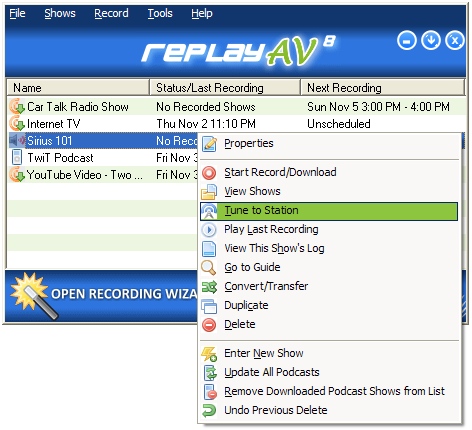
Main Screen
Enlarge Image Enlarge Image: Main Screen

Downloads


Join Our Newsletter
Title: Replay A/V
Author/Publisher: Applian Technologies
Ease of use: Not Rated
Latest Version: 8.41 (details)
OS Support: Windows 98 Windows Me Windows 2000 Windows XP
License: Commercial, $USD49.95
Date Added: Sep 4, 2006
Last Updated: Dec 12, 2007
Page Viewed: 6870 times

  Email Updates
email me whenever this software gets updated

Send to Friend   Send to Friend

User Rating:

Details / Vote Now
User Comments:
Mr_Steve: i hope it works i like...
More / Post Your Comments

Summary Links Images Ratings History Tools

Categories:

Supported File Formats:

Input Files: FLV, MOV, MP3, RAM, RM/RMVB, SWF, WMA, WMV

Description:

Replay A/V makes it easy to save all types of online media. You can record almost any streaming audio and video instantaneously, or schedule recordings to happen automatically later. Plus, the integrated Replay Media Guide lets you pick Radio Shows, Radio Stations, TV Stations and Podcasts to record with a single click. Replay A/V also captures Sirius and XM Online, too!

All the popular formats are supported, including Windows Media™, Real™, Streaming MP3, Flash Animations and Flash Video. Plus, Replay A/V includes an audio recorder that can snag anything you can hear.

If you have an iPod or another MP3 Player, Replay A/V has some very handy ways to copy files to your device. For iPods, you can make Audiobook files, which let you make bookmarks in long audio files. All recordings can be automatically copied to any MP3 Player or iTunes.

For recording streaming video or audio, Replay A/V captures the following formats:

  • Windows Media: HTTP, MMS, RTSP
  • Real: HTTP, RTSP
  • QuickTime: HTTP
  • Flash: SWF
  • Flash Video: FLV
  • AOL Video (NSV)
  • Shoutcast/Live 365 (streaming MP3)
  • SlingBox™ streams

Revision History:

Version 8.41
  • Release Date: Dec 12, 2007
  • This version is an exciting breakthrough for XM & Sirius customers. Now you can automatically schedule and record using Stream Capture, which lets you record two or more shows simultaneously, with perfect quality, and eliminates many tuning errors or problems with an "Are You Listening" prompt. No other software can do this.
View complete revision history

Downloads:

Download: Official Download Page Title: Official Download Page
Link: Download

Description: Download a demo of Replay A/V from the official site


User Rating:

  Average Rating: Your Rating:
Registered Users:
Non-Registered Users: (2 votes)

User Comments:

Sorry, but you must be logged in to use this feature.

Please note that the forum has a separate login/registration system. You will need to sign up and login to the forum separately.

Username:
Password:
Remember Login?
 

Don't have an account? Sign up here
Lost your login/password?
Top 10
Features

H.264 Zone: H.264 news, articles and downloads


Software Submissions