Software - > Rapid Menu Writer

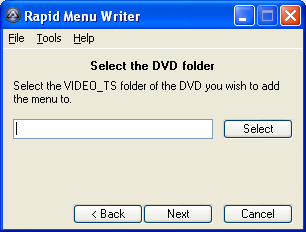
Screenshot
Enlarge Image Enlarge Image: Screenshot

Downloads


Join Our Newsletter
Title: Rapid Menu Writer
Author/Publisher: Official Website
Ease of use: Not Rated
Latest Version: 1.3 (details)
OS Support: Windows XP Windows Vista
License: Open Source
Date Added: Aug 16, 2009
Last Updated: Sep 21, 2009
Page Viewed: 1074 times

  Email Updates
email me whenever this software gets updated

Send to Friend   Send to Friend

User Rating:
Vote Now

Summary Links Images Ratings History Tools

Related Forum Threads:

Loading

Downloads:

Download: Rapid Menu Writer 13.exe Title: Rapid Menu Writer 13.exe
Link: Download
Size: 1.96 MB

Description: Download Rapid Menu Writer


Download: Official Forum Thread Title: Official Forum Thread
Link: Download

Description: Visit the official forum thread for Rapid Menu Writer


Archive Downloads Download Older Versions (6 downloads)...


Description:

Rapid Menu Writer is a wizard for creating very simple DVD menus. Rapid Menu Writer is fast and efficient! It can add a menu to a DVD in seconds, and uses only a fraction of your hard disk space.

Rapid Menu Writer automates two well known software packages (PgcEdit and DVDStyler) in a manner that takes the difficulty out of adding a menu to a DVD. The result is a very simple to use and reliable wizard that anyone can use.

Categories:

Supported File Formats:

Input Files: DVD, VOB
Output Files: DVD

Revision History:

Version 1.3
  • Release Date: Sep 21, 2009
  • Download(s):
  • Fixed the Back buttons (broken from v1.1).
  • Fixed the Finished message at the end to be shown (was previously hidden).
  • Changed the DVDStyler Preview message to include Yes and No buttons to continue or go back.
  • Added an error message when the DVD player doesn't exist when Play DVD is clicked.
  • Updated the error messages for missing PgcEdit and DVDStyler executables to include the path.
  • Added a "Restore Defaults" button to the Options GUI.
  • Updated the help file.
  • Added verbose logging to the "Assign commands to the menu buttons" section.
  • Changed the style of menu buttons to use frames with borders.
  • Changed the default menu colour scheme to be blue buttons with white text and borders.
View complete revision history

User Rating:

  Average Rating: Your Rating:
Registered Users: No ratings recorded
Non-Registered Users: No ratings recorded

User Comments:

Sorry, but you must be logged in to use this feature.

Please note that the forum has a separate login/registration system. You will need to sign up and login to the forum separately.

Username:
Password:
Remember Login?
 

Don't have an account? Sign up here
Lost your login/password?
Top 10

Software Submissions