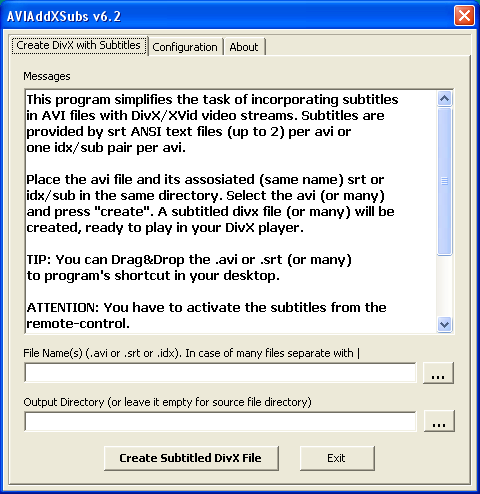
AVIAddXSubs is a simple free program to incorporate subtitles from .srt (ANSI text, up to 2 srt) or idx/sub (containing up to 8 subtitles) quickly and easily to your avi files containing DivX/XVid video streams. Just place the avi and its associated (same name) srt in the same directory and Drag&Drop the avi on AVIAddXSubs icon or shortcut in your desktop. In 2-3 minutes a new file with divx extension will be created and be ready to play in your hardware DivX player.
Input Files: AVI, DivX, SRT, SUB, Xvid
Output Files: DivX
Windows 2000/Windows XP/Windows Vista
 PS3 AVIAddXSubs AVI Subtitles Guide PS3 AVIAddXSubs AVI Subtitles Guide 
Description: This guide shows you how to add switchable (not hard coded) subtitles to AVI files without re-encoding using AVIAddXSubs, and get them to show up on the PS3
|
|
|
Version 9.15
- Release Date: Apr 19, 2014
- Download(s):
- Added option "Merge mkv and idx/sub" (Configuration 2 tab). If this option is checked AVIAddXSubs merges mkv files with idx/sub subtitles generated from srt. It appears that some TVs support idx/sub only if they are merged with mkv and not as separate files. This options automates idx/sub incorporation to mkv files instead of using, as an additional manual step, mkvmerge GUI to do the same. This to work mkvmerge.exe utility has to be copied in AVIAddxSubs installation directory.
View complete revision history


 Home
Home


 AVIAddXSub.zip