Software - > AVCutty

Automatic scene detection
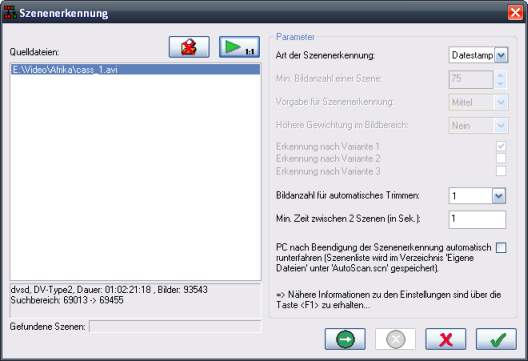
Enlarge Image Enlarge Image: Automatic scene detection
More Images More Images

Downloads


Join Our Newsletter
Title: AVCutty
Author/Publisher: Official Website
Ease of use: Not Rated
Latest Version: 3.0a (details)
OS Support: Windows 2000 Windows XP
License: Freeware
Date Added: Oct 21, 2006
Last Updated: Jun 28, 2009
Page Viewed: 13227 times

  Email Updates
email me whenever this software gets updated

Send to Friend   Send to Friend

User Rating:
Vote Now

Summary Links Images Ratings History Tools

Related Forum Threads:

Loading

Downloads:

Download: Official Download Page Title: Official Download Page
Link: Download

Description: Download AVCutty from the official site


Download: avcutty3_setup.exe Title: avcutty3_setup.exe
Link: Download
Size: 934 KB

Description: Download AVCutty


Download: avcutty24_setup.exe Title: avcutty24_setup.exe
Link: Download
Size: 653 KB

Description: Download AVCutty 2.4f for use in Windows 2000


Archive Downloads Download Older Versions (1 downloads)...


Description:

What is AVCutty? AVCutty is able to capture video material from a DV camera. It saves the videos in AVI files. It also simplifies the splitting of AVI files into the different scenes. It scans the AVI files and detects the scene changes either optically or per DV date stamp. Each scene can be saved into a new AVI file. Because AVCutty does not recompress the video data, the process is lossless. Also it is possible to trim the scenes in a comfortable manner. So, AVCutty is very useful, particularly at the beginning of your video project.

Features:
  • Captures video material via Firewire.
  • AVCutty is able to find scenes in AVI files automatically (optically or per dv datestamp).
  • It scans through the AVI files and detects scene changes.
  • Allows you to manually split AVI files into scenes.
  • Allows you to save each scene into a new, separate AVI file.
  • The process is lossless.
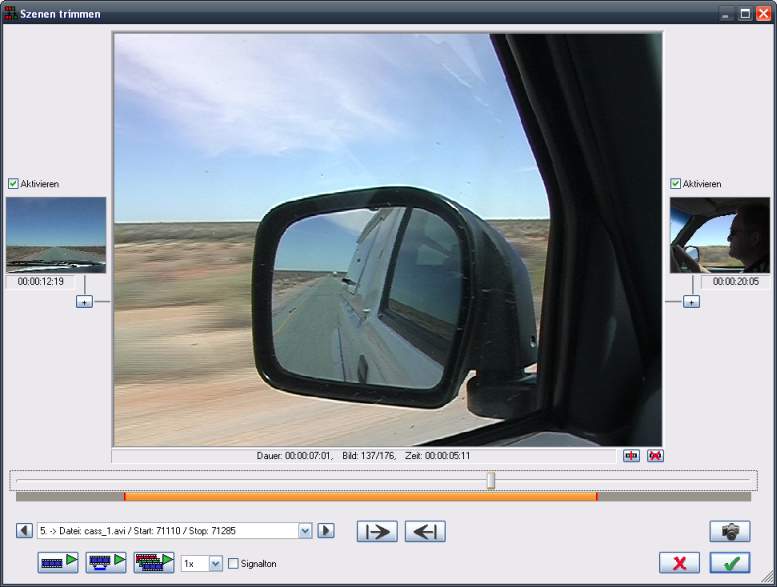
  • Provides easy and convenient trimming of scenes.
  • "Mini-Editing-System": it is possible to save the defined scenes in a given order into one AVI file (eg. for export to the camera).
  • Exports scenelist (EDL/CSV/AVS).
  • Generates a scene index of the defined scenes or the AVIs in a directory including thumbnails, using editable layout templates.
  • Splitts of AVI files after N frames or N seconds.
  • Saves frames as BMP.
  • Supports different languages (German, English, Dutch, Hungarian).
  • . . .

Categories:

Supported File Formats:

Input Files: AVI, DV
Output Files: AVI

Revision History:

Version 3.0a
  • Release Date: Jun 28, 2009
  • Download(s):
  • New column in the scene list: For each scene it is possible to set a state flag. The flag can be used to mark the trimmed scenes as 'ready'. So it is easier to keep in view, which scene is finished.
  • Correction in the device selection of the capturing dialog (corresponding AVCutty/DirectX message: AddPreviewGraph()/E_INVALIDARG)
  • The representation of the selection rectangle in the storyboard was changed.
  • New option for saving scene AVIs: It is possible to delete the source AVI files after generating the scene AVI files (including an extra verification dialog before deleting).
  • New option int the settings dialog: When exporting a video frame into a BMP file, it is possible to include the datestamp of the video frame into the file name.
  • Better support of shortcuts when renaming a scene group (keys , and )
  • Now it is possible to select "overwrite all"/"skip all", if a scene AVI already exists.
  • Scene index: #PURESRCFILENAME returns the filename and not the path.
  • Some changes to enhance the usability.
  • Some internal changes and fixes.
View complete revision history

User Rating:

  Average Rating: Your Rating:
Registered Users: No ratings recorded
Non-Registered Users: (4 votes)

User Comments:

Sorry, but you must be logged in to use this feature.

Please note that the forum has a separate login/registration system. You will need to sign up and login to the forum separately.

Username:
Password:
Remember Login?
 

Don't have an account? Sign up here
Lost your login/password?
Top 10

Software Submissions