Software - > AVCHDCoder

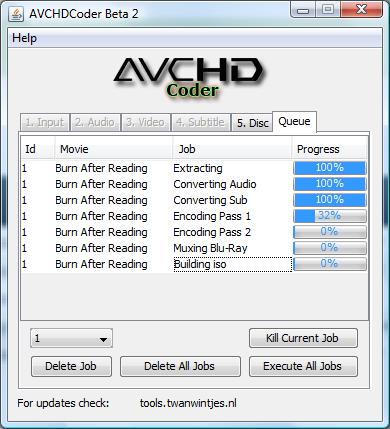
Screenshot
Enlarge Image Enlarge Image: Screenshot

Downloads


Join Our Newsletter
Title: AVCHDCoder
Author/Publisher: Official Website
Ease of use: Not Rated
Latest Version: 10.02.01 (details)
OS Support: Windows XP Windows Vista
License: Freeware
Date Added: Feb 2, 2009
Last Updated: Feb 2, 2010
Page Viewed: 6154 times

  Email Updates
email me whenever this software gets updated

Send to Friend   Send to Friend

User Rating:
Vote Now

Summary Links Images Ratings History Tools

Related Forum Threads:

Loading

Downloads:

Download: Official Download Page Title: Official Download Page
Link: Download

Description: Download AVCHDCoder from the official site


Archive Downloads Download Older Versions (14 downloads)...


Description:

With AVCHDCoder you can convert a MKV file to AVCHD. Almost everything will be done for you. It is almost fool proof. Because it is still Beta not everything can be done with the tool.

Requirements:

Categories:

Supported File Formats:

Input Files: MKV
Output Files: AVCHD

Revision History:

Version 10.02.01
  • Release Date: Feb 2, 2010
  • Possible introduction of a major issue. CoreAVC will let AVCHDCoder hang (Not responing) when CoreAVC is registered and in use as decoder. Un-Register and use ffdshow to fix the problem. CoreAVC's authors will be contacted by me.
  • Fixed - AC3 to AC3 or True-HD Core to AC3 conversion failed.
  • Fixed - WMV bug - introduced in 09.12.06
  • Fixed - 1440x1080 with an AR of 16:9: Borders were added. Now it will be resized to 1920x1080.
  • Fixed - 24fps movie went out of sync - introduced in 09.12.06
  • Fixed - ASS/SSA subs as source were not displaying correctly.
  • Fixed - Multiple cosmetic fixes in Queue
  • Fixed - Some 4:3 SD sources where stretched. Now Aspect Ratio will be kept.
  • Fixed - No message if there are unsupported characters in the path. (Allowed: a-z, A-Z, 0-9, &, . and whitespace) Posible future fix: Allowing other characters like é, ä etc. Problem lies in the batch scripts in combination with Encoding problems. But now a nice error will pop up.
  • Fixed - Sources with a negative audio delay went out of sync. Now black frames will be inserted. (Doesn't work for all sources with this problem)
  • Fixed - "strange" resolutions where not converted correctly
  • Added - High Quality Subtitles conversion (avs2bdnxml + avisynth + vsfilter + bdsup2sub). Normal Quality Subtitle Conversion with tsMuxer is still possible.
  • Added - LPCM support: LPCM to AC3 (M2TS, TS and Blu-ray only and LPCM cannot be kept yet)
  • Added - In the introeditor you can now: Keep aspect ratio, Zoom, Stretch an image.
  • Added - In the introeditor you can now add an image as overlay on top on the introvideo. Select between 12.5, 25, 37.5 and 50% visibility
  • Added - Default subtitles preset can be set.
  • Added - Default encoding speed can be set.
  • Added - You now can select the number of Threads that will be used for subtitle conversion (Only applies to ASS/SSA and SRT to PGS conversions)
  • Added - Move an item up or down after you added the item to the disc.
  • Added - Limitation of number of characters in Title. (UDF volume label limit)
  • Added - You can now launch usefull applications via AVCHDCoder.
  • Added - You can now see how much time an item in the Queue took.
  • Added - 64bit encoding. It is not tested well for now and should only be used for testing. Only x264 is in 64 bit.
  • Changed - Preview button now gives you a full scale preview of the introimage. (Just 1 frame)
  • Changed - Replaced the Remove All button with an Add button.
  • Changed - Settings and Log are moved to the menu's. The main screen will now only contains Input, Select Streams, Output and Queue
  • Changed - AVCHDCoder now works partially on Process Id's. Example: Pauze while encoding only pauses x264.exe that AVCHDCoder started.
  • Changed - PGS sup conversion is now done with BDSup2Sub
  • Updated - ffdshow to rev3222 (Manual Install)
  • Updated - Win7DSFilterTweaker to v2.6 (Manual Install)
  • Updated - ssatosrt to R3
  • Updated - BDSup2Sub to 4.0.0
View complete revision history

User Rating:

  Average Rating: Your Rating:
Registered Users: No ratings recorded
Non-Registered Users: (5 votes)

User Comments:

Sorry, but you must be logged in to use this feature.

Please note that the forum has a separate login/registration system. You will need to sign up and login to the forum separately.

Username:
Password:
Remember Login?
 

Don't have an account? Sign up here
Lost your login/password?
Top 10
Features

H.264 Zone: H.264 news, articles and downloads


High Definition DVD Zone: Blu-ray/HD DVD news, articles and downloads


Software Submissions