|
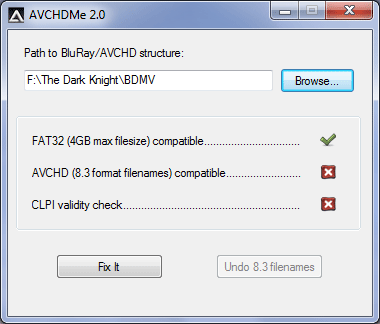
AVCHDMe is for anyone with a PS3 who wants to be able to play a Blu-ray structure from a USB device on a PS3
This is for anyone with a PS3 who wants to be able to play a BluRay structure from a USB device on a PS3. The benefits of this over streaming are that you get VC-1 video, HD audio and subtitle support.
Firstly, you must use TSMuxer to select which streams you want to keep. In the Split/Cut tab, split the files every 4GB (this is because the PS3 will only read FAT32 USB devices)
Once you have your output from TSMuxer, place the BDMV and CERTIFICATE folder inside a directory called AVCHD on the root of your USB device. Run AVCHDMe and point it at the BDMV folder, click Apply. The USB device can now be connected to the PS3 and the BD structure will play.
Anyone who still uses this for doing AVCHDs on a FAT32 hard disk to move over to AVCHD Manager, which includes all the functionality of AVCHDme and more.
Main Categories: Author, Edit, Gaming, High Definition (Blu-ray, HD DVD, HDTV), MPEG-4 (ASF/WMV, QuickTime, Real, VC-1, H.264 ...)
Sub Categories:
Input Files: AVCHD
Output Files: AVCHD, Blu-ray
Windows XP/Windows Vista
Version 2.0
- Release Date: Mar 18, 2009
- Download(s):
- Added 4GB max file size check
- Added "Undo 8.3 filenames" button to name your files back to their original names
- Path input box now accepts drag and drop
- Browse and dragndrop now accept either root or BDMV folder as input
- New TSMuxer fixes CLPI and pause problems but left check in just in case anyone uses on an old mux
View complete revision history
|

|
Rate this software:
Your Rating:
You have not voted yet!
Average: 3.57/5
Total Ratings: 7
|
|
|
| |
|
|
|
|

 Home
Home


 AVCHDMe.exe