
Articles - > Using VirtualDub - Re-encode AVI for standalone compatibility

Printer Friendly Version Printer Friendly Version

User Rating:
No ratings recorded - Vote Now

User Comments:
Post Your Comments

Page Select:

  1   2   3   4   5   6  

Page 6 of 6: Using VirtualDub - Re-encode AVI for standalone compatibility

Related Articles:
  1. AVI ReComp AVI to XviD Re-Encoding Guide
  2. AVI to (Xbox 360 compatible) WMV Conversion Guide
  3. Basic Guide How to Convert AVI Files to DVD with Avi2DVD
  4. Xbox 360 H.264 Conversion Guide
  5. PS3 H.264 Conversion Guide
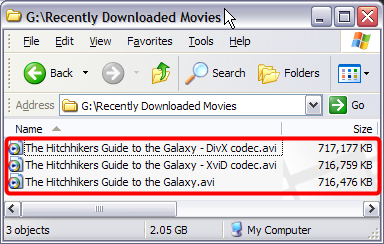
Your newly created avi file should be almost the same size as the original. (Screen Shot Below)


Enjoy!


  1   2   3   4   5   6  

Article Navigation:

Page 1:
Page 2:
Page 3:
Page 4:
Page 5:
Page 6: <--

User Rating:

  Average Rating: Your Rating:
Registered Users: No ratings recorded
Non-Registered Users: (29 votes)

User Comments:

Sorry, but you must be logged in to use this feature.

Username:
Password:  
Remember Login?
Sign Up