

 Home
HomePage 3 of 9: Using Nero InfoTool
Disc Tab
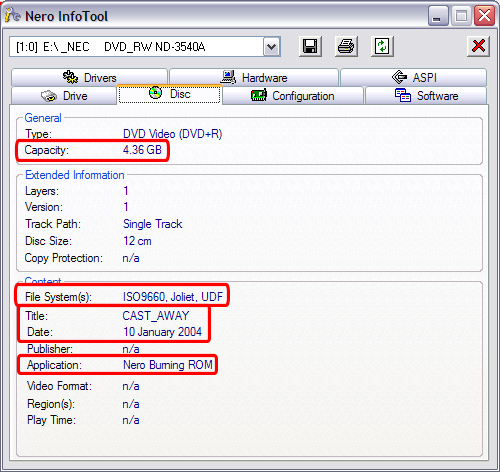
This is the tab you would need to click on to find out specific information about the media currently in that drive. In my screen shot I have a disc that was previously burnt to. This tab is basically self explanatory but, it gives you the "Title" of the DVD, that date it was burnt, the file system (a standard DVD-Video should be UDF 1.02 or ISO/UDF 1.02 bridge), the disk capactity, and which program was used to burn it (red). (Screen Shot Below)
This is the tab you would need to click on to find out specific information about the media currently in that drive. In my screen shot I have a disc that was previously burnt to. This tab is basically self explanatory but, it gives you the "Title" of the DVD, that date it was burnt, the file system (a standard DVD-Video should be UDF 1.02 or ISO/UDF 1.02 bridge), the disk capactity, and which program was used to burn it (red). (Screen Shot Below)


