

 Home
HomePage 2 of 9: Using Nero InfoTool
Drive Tab
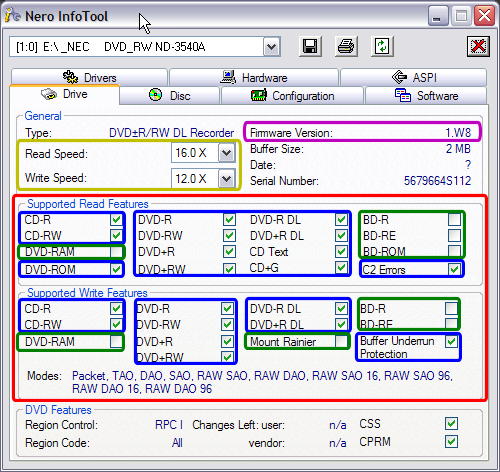
This is the tab you need to click to basically see what your drive is and isn't capable of doing. It tells you the max "Read" and "Write" speeds of the drive (gold). It tells you the current firmware you have installed for the drive (purple). You are mainly concerned with "Supported Features" section (red). It will list all features for both "Read" and "Write" and if your screen has a green check mark in the box, that means your drive supports that feature (blue), if the box is empty then it doesn't support it (green). (Screen Shot Below)
This is the tab you need to click to basically see what your drive is and isn't capable of doing. It tells you the max "Read" and "Write" speeds of the drive (gold). It tells you the current firmware you have installed for the drive (purple). You are mainly concerned with "Supported Features" section (red). It will list all features for both "Read" and "Write" and if your screen has a green check mark in the box, that means your drive supports that feature (blue), if the box is empty then it doesn't support it (green). (Screen Shot Below)


